OmaNotes for Omarchy Linux: A Google Keep-Style, Zero-Knowledge E2EE Note and Task Manager
Score —The architecture and release of OmaNotes, which features a fully Quickshell-based interface, a Rust engine, mouse-first usage, and end-to-end encrypted (AES-256-GCM) backup to Google Drive and Git.
Contents
Summary: OmaNotes is a note app that works with colorful Google Keep-style cards, a Quickshell interface and a Rust engine. It covers mouse-driven usage features such as one-click note creation from the clipboard and templates, encryption with PBKDF2 and AES-256-GCM, backup via rclone and Git, and the 15 tests the app passes.
On the Linux desktop, quickly jotting down an idea, link or to-do list that comes to mind during the daily flow is often squeezed between two extremes: Either we surrender to proprietary cloud note apps where big tech companies scan all our data and train their AI models, or we have to settle for text-based, slow local tools far removed from the elegance of a graphical interface.
To eliminate this dilemma, I am happy to announce OmaNotes, which we designed for the Omarchy Linux desktop ecosystem.
OmaNotes is an independent, open-source desktop extension that combines Google Keep-style colorful cards and to-do list ergonomics with Quickshell 4.0's fluid Wayland interface, a Rust-core system engine and a Zero-Knowledge AES-256-GCM end-to-end encryption (E2EE) architecture.
Keyboard-Free (Mouse & Touch-First) Ergonomics
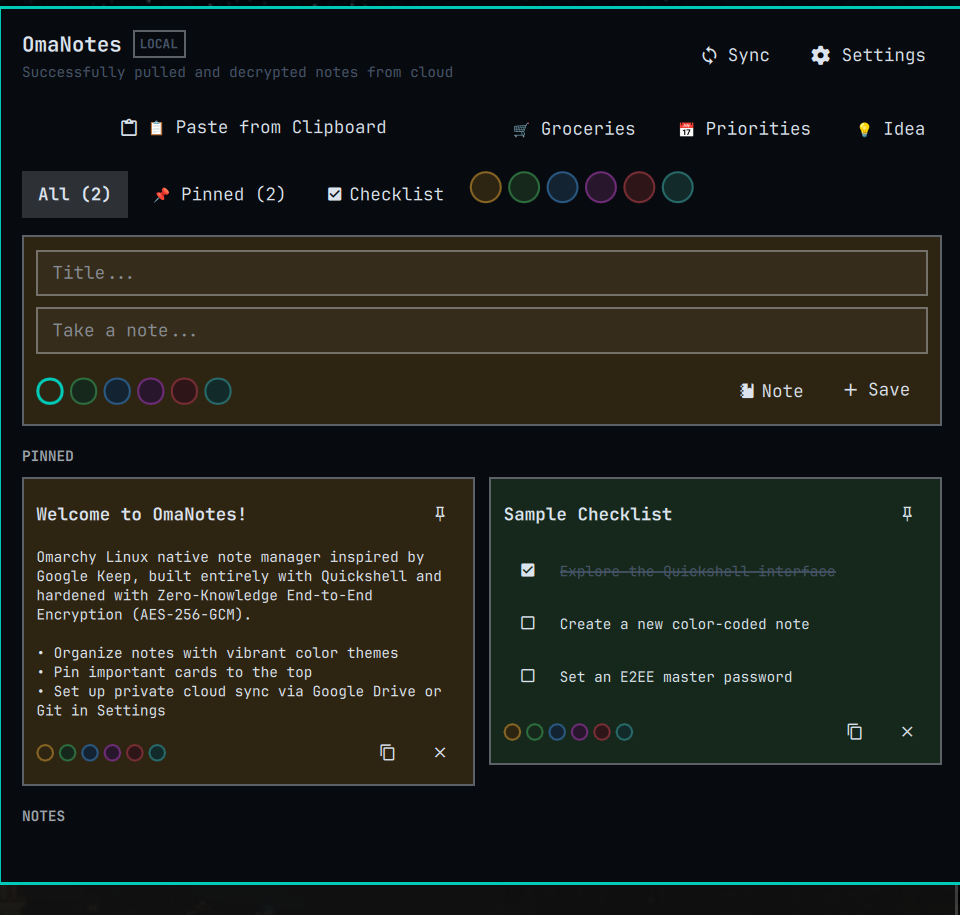
OmaNotes was designed so that in daily use it can be managed with a single click from the top-right bar of the desktop without ever touching the keyboard:
- One-Click Note Creation from Clipboard: A
Paste from Clipboardbutton (wl-pasteintegration) that turns any text, link or task list you copy to the clipboard into a card with one click, without the hassle of typing. - Ready-Made Quick Templates:
Groceries(ready-made shopping list with sample items)Priorities(daily priorities and focus tasks)Idea(idea scribble template)
- Live Filter Chips (Zero Typing): Instead of typing in the search bar to find a note, filter cards instantly by clicking
All,Pinned,Checklistand the color dots (yellow, green, blue, purple, red, stone). - Quick Actions on the Card: One-click checkbox ticking (strikethrough), one-click card color change from the bottom palette, pinning, duplicating and secure deletion.
Zero-Knowledge End-to-End Encryption (Zero-Knowledge E2EE)
At the heart of OmaNotes is a mathematical encryption layer that guarantees no one other than you (including the cloud provider) can access your data:
- Cryptographic Key Derivation: The master password you choose is converted into a 256-bit encryption key using the PBKDF2-HMAC-SHA256 standard with 10,000 iterations and a 16-byte cryptographically random salt.
- AES-256-GCM Authenticated Encryption (AEAD): A 12-byte single-use random nonce is generated for each encryption operation. While the data is encrypted, an authentication tag is also generated, providing full protection against byte-level tampering in the cloud (bit-flipping attacks).
- Zero Plaintext Leakage: The
notes.encpackage transferred to the cloud vault contains no header, content or tag in unencrypted (plaintext) form.
Multi-Cloud Backup and Disaster Recovery
Keep your notes either on Google Drive or in your own private Git repository:
- Google Drive / Nextcloud / WebDAV (
rclone): One-click encrypted synchronization over the system's rclone remotes. - Private Git Vault (
git): Back up the encryptednotes.encfile to your own private Git repository withgit commit & push, versioning it. - Disaster Recovery (
--pull): Even if you format your computer or switch to a new device, you can download the encrypted package from the cloud with one click and restore all your cards in seconds with your master password.
Security Architecture and Omarcom Standards (AGENTS.md)
OmaNotes was built to fully comply, without exception, with the official security guidelines of the Omarchy Linux ecosystem (AGENTS.md):
| Security Area | Applied Architectural Rule |
|---|---|
| Isolated Process Groups | Child processes are run in an independent process group (cmd.process_group(0)). |
| Non-Blocking I/O | Pipes are read without blocking using O_NONBLOCK + POSIX poll(). |
| Monotonic Deadlines | Freezes are prevented with a 30-second absolute timeout check. |
| Unconditional SIGKILL | On timeout, SIGTERM -> 5ms -> SIGKILL ensures no grandchild processes are left in the background. |
| 0600 / 0700 Atomic Write | Files are written via .tmp_* and, after sync_all, moved with an atomic rename using 0600 permissions; symlinks are rejected. |
| Plain Text Guarantee | XSS/HTML injection is prevented by enforcing textFormat: Text.PlainText on all user and clipboard text on the QML side. |
15/15 Automated Test Suite
Under the Rust test infrastructure, OmaNotes has passed all 15 different unit, security, stress and chaos tests with a perfect score:
- Unit Tests (5/5): 0600 atomic storage, buffer overrun prevention, monotonic deadline, crypto round-trip, wrong password rejection.
- Advanced Security & Chaos Tests (6/6):
- Bit-Flipping Test: AEAD verification rejecting the data when a single byte in the encrypted package is tampered with.
- Shell Injection & Fuzzing: Blocking system commands when commands such as
; rm -rf / ; touch /tmp/pwnedare injected into the note title. - Corrupt File Recovery: Simulating a sudden power loss by writing half-truncated JSON into
notes.json, and the engine repairing itself without crashing. - Stress Test: Scanning 1,000 notes in < 50ms and transferring 64 KB of large data.
- Concurrency: 10 separate threads adding notes at the same time with no race condition occurring.
- Network Interruption: Returning a clean error without hanging on unreachable Git/rclone targets.
- Integration Tests (4/4): Symlink attack rejection, stubborn grandchild process cleanup, CLI resilience, end-to-end Git cloud loop.
Installation and Usage
On your system with Omarchy Linux installed, you can add the repository and start using it with a single command:
# 1. Eklentiyi sisteme ekleyin
omarchy plugin add https://github.com/ozdil/omarchy-omanotes.git

# 2. Güvenli kaynaktan yerel derlemeyi yapın
cd ~/.config/omarchy/plugins/ozdil.omanotes
cargo build --release --locked
install -m 755 target/release/omanotes-engine ./omanotes-engine

# 3. Omarchy barınıza ekleyin (~/.config/omarchy/shell.json içine)
# "bar.layout.right" altına: { "id": "ozdil.omanotes" }

# 4. Shell'i yenileyin
omarchy-restart-shell
For a quick status check from the terminal:
~/.config/omarchy/plugins/ozdil.omanotes/omanotes-statusMy reading
- The cloud only sees the encrypted package: notes are encrypted before leaving the device; even titles are not plain text.
- Backups can be kept in two places: Drive or WebDAV via rclone, a personal repository via Git.
- Tests also cover failure cases: corrupted files, network interruptions and concurrent write scenarios were tested.
Resources
- GitHub Repository: ozdil/omarchy-omanotes
- License: MIT License
- Curator & Standard: Omarchy Linux (
CONTRIBUTING.md) & security guidelines