OmaStudio for Omarchy Linux: A Lightroom-Quality, Open-Source RAW Photo Editor with DaVinci Color Wheels
Score —With its Quickshell 4.0 GPU-accelerated interface, multi-core Rust/Rayon engine, DaVinci-style 3-Way color wheels, and AI-powered social media optimization, Linux's missing creative link is now complete.
Contents
Summary: OmaStudio is an open-source RAW photo editor I wrote for Omarchy. The article covers the Quickshell interface and the Rust and Rayon engine, supported sensors and RAW formats, touchpad gestures, simple and professional modes, three-way color wheels, export settings for social media, and safety rules.
One of the biggest long-standing dilemmas for creative professionals and photography enthusiasts on the Linux desktop is dependence on the Adobe Lightroom ecosystem. Although valuable open-source projects such as Darktable and RawTherapee exist, there has always been a felt lack of a lightweight, focused native tool that combines modern Wayland integration, fluid touchpad gestures, minimalist ergonomics, and the DaVinci Resolve 3-Way color grading wheels that have become the gold standard of the video industry.
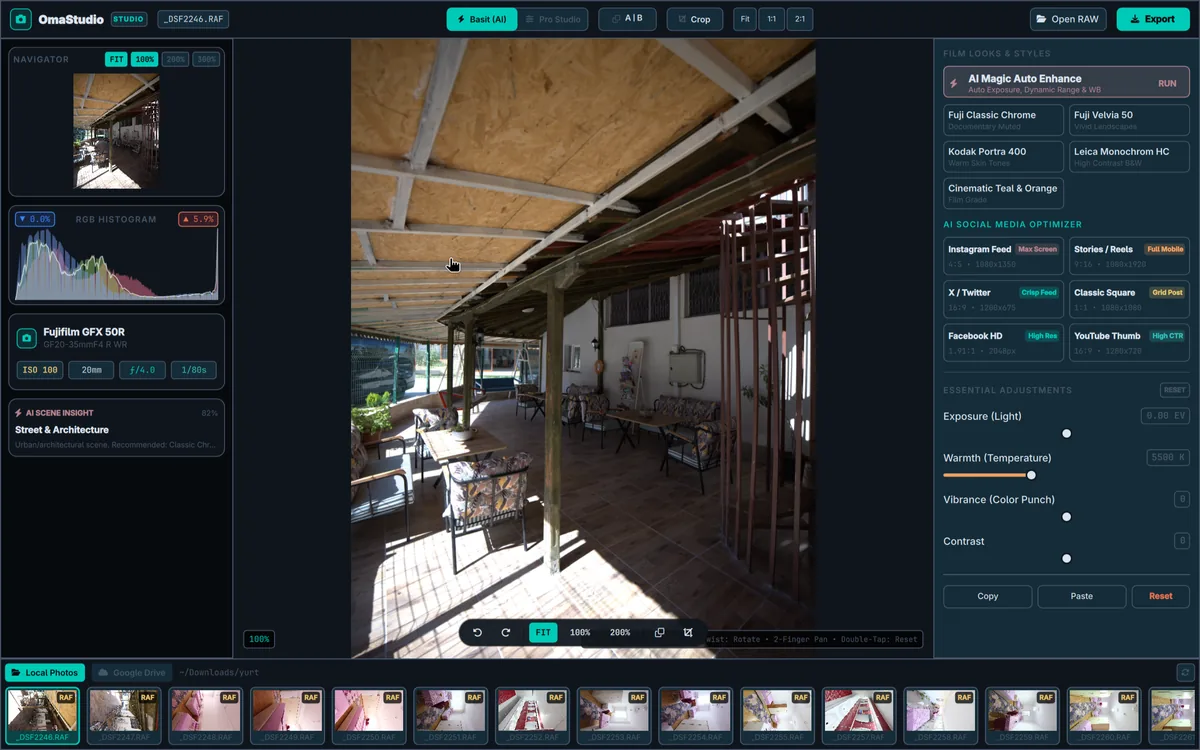
OmaStudio (or its terminal-friendly name OmaRaw), which I developed to build a creative workflow free of monthly subscription chains, closed-box telemetry, and clunky interfaces, is now available for the Omarchy Linux ecosystem.
Architecture: GPU-Accelerated Quickshell and Multi-Core Rust
OmaStudio is not an ordinary Electron wrapper or a clunky GTK interface. The system architecture is built on two strong foundations:
-
Interface Layer (Quickshell / Qt 6 QML): A GPU-accelerated, smooth Wayland scene with a 60+ FPS refresh rate that talks directly to the desktop. Logarithmic Pinch-to-Zoom that works fluidly on touchscreens and Mac-precision touchpads, free framing rotation at your fingertips, and kinetic panning.
-
Processing Engine (Rust + Rayon + LibRaw): An independent Rust background engine (
omastudio-engine) that makes no compromises on memory safety and zero-cost abstractions. It accesses pixels directly through LibRaw FFI; with multi-core parallel matrix computations (Rayon), it processes even 50+ megapixel RAW photos instantly without freezing or memory bottlenecks.
- OmaStudio RAW Processing and Visualization Pipeline: 16-Bit Linear Color Pipeline
- STEP 1: Bayer, X-Trans, DNG, RAF raw sensor data. (RAW File, Raw Sensor Data)
- STEP 2: LibRaw Demosaic · AHD / DHT high-quality interpolation.
16-Bit ADC Read
- STEP 3 (CORE): Wide color gamut mathematical transformations. (16-Bit Linear Pipeline, Float Matrices)
- STEP 4: Rayon Multi-Core · Parallel distribution across all CPU cores.
Parallel Computation
- STEP 5: Quickshell Viewport · GPU texture, fluid pan and pinch-to-zoom.
60+ FPS Wayland
- DaVinci 3-Way Wheels: Lift, Gamma, Gain, Offset: 8-Band HSL Mixer: Hue, Sat, Lum per color Optics and Profile: Lens Distortion, Defringe, ICC (16-Bit Mathematical Color Modules:)
Key Features
1. Comprehensive Sensor and RAW Support
Whatever your camera, OmaStudio is ready:
- Fujifilm: X-Trans II, III, IV and V 6x6 matrix sensors and Bayer models (
.RAF). - Nikon:
.NEFand.NRW, including Z8, Z9 High-Efficiency HE/HE* algorithms. - Sony: Alpha series compressed/lossless
.ARWand.SR2. - Canon: Modern ISOBMFF-structured
.CR3and classic.CR2. - Leica, Hasselblad & DNG: Smartphones, DJI drones and medium format cameras (
.DNG,.RWL,.3FR).
2. Mac-Quality Touchpad & Mouse Ergonomics (1:1 Apple Trackpad Feel)
The issue creatives who move to the Linux desktop complain about most is that trackpad and mouse interactions are not as silky and predictable as on macOS. OmaStudio solved this problem at its root. Interface interactions give exactly the same response as Apple Magic Trackpad and MacBook canvas ergonomics:
- Pinch-to-Zoom: When you spread and close two fingers, it zooms smoothly and logarithmically to the pixel center directly under the cursor, without jumping.
- Smart Rotation & 3.5° Deadzone: While zooming, a special filtering mechanism is active that prevents fingers from slipping slightly and accidentally tilting the photo; with deliberate turns, the canvas follows your finger's angle through 360°.
- Kinetic Pan: Two-finger scrolling provides a frictional (
0.75damping) and fluid glide over the photo, just like moving across a sheet of paper. - Double-Tap (Double Touch / Click): Just like in macOS Preview or Lightroom, it instantly switches between fit-to-screen (%100 Fit) and %200 detail focus.
- Alt + Wheel: For mouse users, the mouse wheel zooms on focus, while the
Alt + Wheelcombination offers micro framing correction with 1.5° precision. With smart boundary anchors (clampPan) that prevent the image from flying off the canvas and getting lost, you are always in control.
3. Gradual Discovery (Simple Mode & Pro Studio)
The photo editing experience was designed around two distinct need profiles:
- Simple and Fast Mode: One-click AI Magic Auto for everyday shots and just 4 basic adjustment sliders (Light, Temperature, Vibrance, Contrast).
- Pro Studio Mode: Studio-level parametric control with an independent RESET button in every module header:
- White Balance: 2,000K – 12,000K Kelvin spectrum and $\pm 100$ Tint adjustment.
- Light & Dynamic Range: $-5.00,\text{EV} \dots +5.00,\text{EV}$ logarithmic exposure, S-Curve contrast, Highlight recovery, deep shadow lifting, Whites & Blacks anchors.
- Presence & Texture: Texture, Clarity, Dehaze, Vibrance and Saturation.
- 8-Band HSL Color Mixer: Independent Hue, Saturation and Luminance control across 8 separate spectrum colors.
- Detail & Optics: Two-stage noise reduction (Luma NR), sharpening, vignette, purple/green fringing prevention with Defringe, and Lens Distortion compensation that corrects barrel/pincushion distortion.
4. DaVinci Resolve-Style 3-Way Color Wheels
The Lift, Gamma, Gain and Offset color wheels, rarely seen in the photography world but indispensable to the cinema industry, are integrated directly into the interface:
- Lift: Color direction of the shadows and an independent base luma ring.
- Gamma: Midtone balance that shapes skin tones and the body of the scene.
- Gain: Highlight disc that colors the sky and light glints.
- Offset: Balanced toning across the entire dynamic range without shifting the overall color balance of the scene.
5. AI-Powered Social Media Optimizer
If editing a photo is half the work, presenting it in the right format on the right platform is the other half. OmaStudio runs platform-specific smart framing and microcontrast algorithms that compensate for compression loss with a single click:
| Platform | Aspect Ratio | Resolution | Optimization Focus |
|---|---|---|---|
| Instagram Feed | 4:5 |
1080 × 1350 | Maximum vertical area, edge sharpness |
| Stories & TikTok | 9:16 |
1080 × 1920 | Full-screen vertical OLED vibrancy |
| X (Twitter) | 16:9 |
1200 × 675 | Mobile and desktop feed clarity |
| Square Portrait | 1:1 |
1080 × 1080 | Classic profile grid compatibility |
| YouTube Thumbnail | 16:9 |
1280 × 720 | Vivid colors for a high click-through rate (CTR) |
Security and Privacy: AGENTS.md Standards
As with all native applications in the Omarchy Linux ecosystem, OmaStudio adheres to strict security guidelines (AGENTS.md):
- Isolated Process Groups (
cmd.process_group(0)): External helper processes (Rclone, Zenity, etc.) run with a PGID independent of the main process; on timeout they are cleaned up withSIGTERMand then, inevitably,SIGKILL, leaving no zombie processes behind. - Protected File Permissions (
0600/0700): Catalog and recipe files are written atomically via a temporary file with0600permissions (.tmp_...+fs::rename); symlink attacks are strictly prevented. - Quickshell Security: Dynamic data is never executed via
eval()or insecure QML object loaders;textFormat: Text.PlainTextis mandatory in all text components.
Installation and First Steps
Building and running from source on Omarchy or Arch Linux is extremely easy:
# Gerekli kütüphaneleri yükleyin
sudo pacman -S libraw quickshell rclone libjxl libavif zenity rust

# Projeyi derleyin
cargo build --release --locked
install -m 755 target/release/omastudio-engine ~/.local/bin/

# OmaStudio'yu başlatın
omastudio
My read
OmaStudio is concrete proof that in the open source world, photo editing is not only "possible" but can also be done at extremely fast, aesthetic and professional standards.
Without paying monthly subscriptions, without handing your data over to third-party clouds, you can freely practice your photographic art using all the power of your own hardware.
- GitHub: github.com/ozdil/omarchy-omastudio
- License: MIT License